


Weather Neon
4.5490.00 Reviews
App Specs
- Version
- 5.1.2.GMS
- Updated On
- License
- Free
- Downloads
- 500,000+
- Developer
- MobileRise
- Categories
- Weather
- Platform
- Android
Screenshots
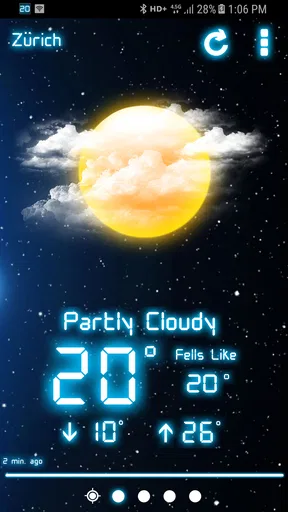
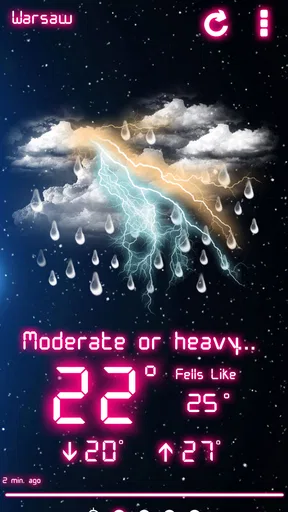
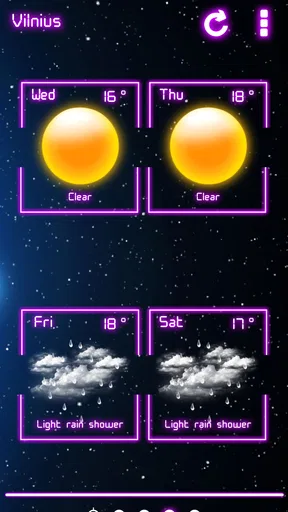
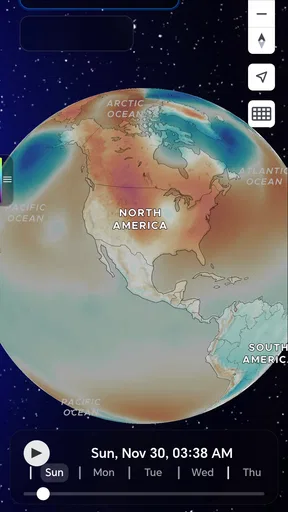
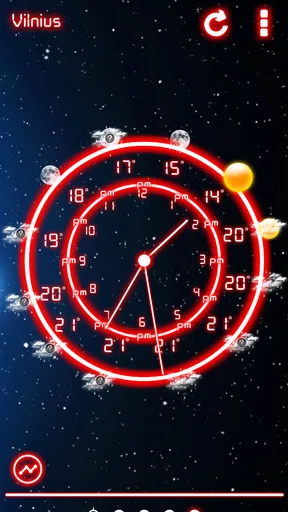
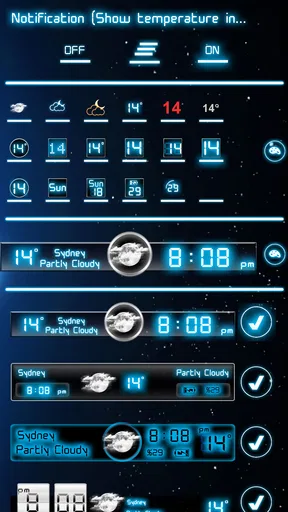
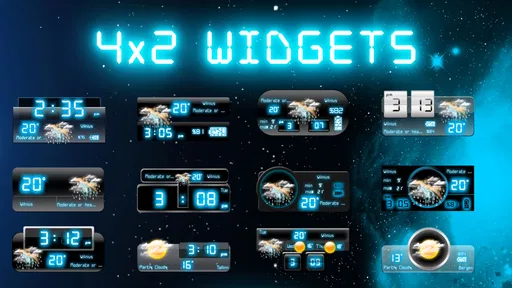
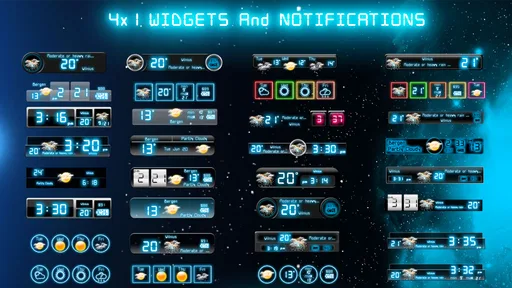
 Analysis by AppCompare
Weather Neon is the kind of weather app I notice most when I am checking the forecast quickly rather than planning an entire trip. It has a clean, stylish presentation, but its appeal is not only visual. MobileRise has built a weather tool that keeps the basic task approachable while leaving extra details for people who want to look a little deeper. I found that balance useful on a shared phone, where one person may only want to know whether to take an umbrella and another may want a closer look at the day ahead.
As a free weather app for Android, it is easy to try without making the household commit to another paid service. The app is rated for Everyone, which makes its general presentation suitable for a broad range of users. It has reached more than half a million installs and holds an average rating of 4.5 from roughly fifteen thousand ratings, so it is clearly not an obscure experiment. Still, those numbers do not tell me whether it will suit your routine. The better question is how you and the people sharing your device actually use weather information.
How Weather Neon works in a shared household
In my experience, the strongest everyday use case is the quick handoff between people. Imagine a parent checking the morning forecast before getting children ready, then another household member looking again before leaving for work. A simple screen matters in that situation because nobody wants to explain a complicated weather dashboard while everyone is trying to get out of the door. Weather Neon feels suited to those short checks: open it, read the main conditions, and decide what to wear or carry.
The visual style also helps when the phone is passed around. A shared device often has users with different levels of patience. One person may enjoy exploring details, while someone else wants a fast answer. The app’s “hidden details” approach gives the curious user something to discover without forcing every visitor through a dense interface. That is a meaningful design choice, although it also means a first-time user may need a little time to understand where the less obvious information is located.
I would not treat it as a household command center, however. It is a weather app, not a shared planning board. It can support a conversation such as “rain looks likely later” or “the temperature changes through the afternoon,” but it does not replace direct coordination between family members. If one person checks the screen and another relies on that information hours later, the second person should still open the app again before making an important decision.
That distinction becomes especially useful when several people use one phone. Weather information is time-sensitive, and a forecast viewed in the morning may not be the forecast someone needs in the evening. I prefer using the app as a prompt to coordinate rather than as a permanent answer. A quick message or spoken update remains necessary when plans involve commuting, outdoor work, school activities, or travel.
What the first setup tells me
The first launch is the point where I would pay attention to the app’s boundaries. Weather tools need a location to be useful, but a shared device raises a practical question: whose location is being used, and is that location still relevant when another person picks up the phone? I would check the displayed place before trusting the forecast, especially if the phone travels between home, work, and school.
Worth Reading Before You Choose

EA SPORTS FC Mobile 26 Is a Bigger Football Game, but It Takes Time

Flipboard Shows What News Apps Must Do Beyond the Feed

Switching to Android Auto Means Rethinking Your Driving Routine

Google Calendar Makes a Crowded Week Easier to Manage

Ludo King Makes the Most of the Minutes Between Plans

Baby Panda World Brings Quick Play to Modern Phones, but Its Game Library Feels Busy
This is not a criticism unique to Weather Neon. It is a common friction point with ordinary weather apps, and it matters more on a shared device. A forecast can look perfectly clear while belonging to the wrong place. My habit would be to make the location visible and confirm it whenever the phone has moved. That small check prevents a surprisingly basic mistake.
I also recommend exploring the interface during a calm moment instead of trying to learn it during a rushed morning. The app is designed with details that may not all be immediately obvious, and discovering them when you have time makes later checks faster. Look for the information you personally use most, then remember where it appears. This is one of the more practical ways to benefit from the app’s layered design.
Because the current version is 5.1.2.GMS and the minimum operating system is Android 9, compatibility is straightforward for many relatively recent Android phones. I would still check the device before installing it on an older household handset. A family may have one newer personal phone and one older shared phone, and the older device is often the one that creates the real compatibility question.
The app itself is free to install, while in-app purchases range from $1.99 to $8.99 per item. That makes the initial trial low-risk, but I would not assume every household member should buy anything simply because an optional feature appears interesting. On a shared phone, discuss purchases first. The person who explores the app may not be the person who manages the device budget, and a free download does not automatically mean every part of the experience is free.
Keeping expectations clear between users
Weather Neon works best when each person understands what it is being used for. For a child, it may be a way to learn whether a coat or rain jacket makes sense. For an adult, it may be a quick check before a commute. For an older relative, a readable overview may be more valuable than extra visual decoration. The same screen can serve these needs, but the explanation around it should change.
I would avoid presenting a forecast as a guarantee, particularly to younger users. Weather can change, and an app cannot remove that uncertainty. A useful household habit is to treat the display as guidance: check the current conditions, look ahead to the relevant part of the day, and leave room for plans to change. That teaches sensible weather awareness without blaming the app when real conditions move differently.
The Everyone age rating is reassuring for general household use, but age suitability and trust are not exactly the same thing. Parents may still want to supervise how a child uses a shared phone, especially if the device contains other personal apps or allows purchases. Weather Neon does not need to become a child’s independent source of important safety decisions. I would use it as a visual aid alongside an adult’s judgment for storms, extreme conditions, or unfamiliar places.
There is also an account-boundary issue worth considering. A shared device can blur who is responsible for settings, purchases, and location choices. I would keep the app’s use simple and agree on who handles any optional purchase or configuration change. If several people require separate locations, separate preferences, or personal histories, a shared installation may feel limiting compared with everyone using an individual weather service on their own phone.
This is where Weather Neon is easier to recommend for a household with one main location than for a family constantly moving between different places. A home tablet or shared Android phone can make sense for checking the local forecast. It is less convenient when one person needs a work location, another needs a school location, and a third is traveling. In that situation, individual apps or browser-based forecasts may offer a cleaner division of responsibility.
Finding useful details without making the screen complicated
The app’s most interesting quality is the way it hides additional information behind a simple surface. I like that approach because weather apps often make the mistake of showing every available measurement at once. A crowded dashboard can slow down a decision that should take a few seconds. Weather Neon gives the impression of a calmer first view while rewarding users who explore.
My practical tip is to separate “decision information” from “curiosity information.” Decision information answers questions such as whether outdoor plans need changing or what clothing makes sense. Curiosity information helps you understand the day in more depth. If you are checking the app with a child, start with the first group and explore the second group together later. That keeps the tool useful instead of turning every forecast check into a long lesson.
Another useful workflow is to check at two different moments: once when making the plan and again shortly before leaving. The first look helps decide whether an activity is sensible; the second confirms whether conditions still support it. This approach is more reliable than repeatedly staring at the same forecast screen and assuming the first impression remains current.
I also found the visual styling can be a benefit and a trade-off. A distinctive appearance makes the app more pleasant to open than a plain utility, especially for people who enjoy polished interfaces. At the same time, style should never outrank readability. If someone in your household finds the presentation distracting or has difficulty interpreting decorative elements, a more traditional weather app may be a better fit.
That is one reason I would test it with the actual people who will use the shared device. The person who installs an app is often not the person who needs it most. Ask whether the main condition is easy to spot, whether the details are understandable, and whether the screen remains comfortable in the situations where the phone is normally checked. A stylish design is valuable only when it helps the user make a decision.
Where it stands beside ordinary weather alternatives
Compared with a basic phone weather widget, Weather Neon offers a more deliberate experience. A widget wins when you want information without opening an app, especially during a rushed morning. Weather Neon wins when you are willing to open the screen and look beyond a single glance. I would choose the widget for a tiny routine check and this app for a more engaging look at the day.
Compared with a large, feature-heavy weather service, it feels less intimidating. Bigger alternatives may be preferable for users who need extensive maps, detailed alerts, specialist forecasts, or highly technical information. Weather Neon is more appealing to someone who wants a friendly daily forecast with extra layers available when needed. The trade-off is clear: simplicity improves approachability, while a specialist tool may provide more depth for demanding situations.
It also differs from relying on a search engine or a built-in assistant. Those methods are convenient for one question, but they do not necessarily provide the same visual continuity when you return to check the day again. An installed app can become a familiar household reference point. On the other hand, a search result may be quicker for a visitor who does not want to learn another interface.
I would skip Weather Neon if your main requirement is professional-grade weather analysis, extensive location management, or a feature set designed around severe-weather monitoring. The app’s appeal is its approachable presentation and discoverable details, not the promise of becoming a specialist forecasting workstation. Choosing a different service in that case is not a failure; it is simply matching the tool to the job.
Small frictions that matter over time
The hidden-detail design can create a learning curve. A person who wants everything visible immediately may wonder where certain information has gone. I prefer the uncluttered approach, but I can see why some users would find it less efficient. On a shared device, that difference becomes more noticeable because not everyone has the same interest in exploring.
There is also the ordinary risk of overconfidence. A polished screen can make a forecast feel more definite than it really is. I would be particularly careful when using it for outdoor events, long drives, or decisions involving children. The app can help organize a decision, but it should not be the only reason to ignore changing conditions.
Optional purchases introduce another layer of household friction. The free entry point is convenient, yet shared-device users should know which person is making a purchase and why. I would keep the decision separate from the excitement of discovering an extra detail. First use the free experience long enough to decide whether the app has earned a place in the household routine.
Finally, the app’s value depends on how often you want to interact with weather information. If you only glance at a status bar once a day, a dedicated app may feel like more than you need. If you enjoy checking conditions, comparing parts of the day, or helping a child understand weather changes, its presentation gives you more reason to open it.
My household verdict
I came away viewing Weather Neon as a pleasant middle ground: more thoughtful than a bare widget, but less demanding than a technical weather platform. MobileRise has made a free Android weather app that suits quick household checks while leaving room for users who enjoy discovering less obvious information. The Everyone rating supports broad use, and the current version should be considered alongside the Android 9 minimum when choosing an older shared device.
For a family or shared household, I would install it on a device that mainly serves one location and agree on a simple routine: confirm the place, check the forecast when plans are made, and look again before important outdoor activities. I would also keep account responsibility and optional purchases clear rather than assuming every user has the same authority.
My honest recommendation is to try Weather Neon when you want a stylish, approachable daily weather check with details that reward exploration. It is not the best choice for every situation. People who need specialist forecasting, many separate locations, or instant information without opening an app may prefer another option. But for a shared phone, a household tablet, or anyone who wants weather information to feel less cluttered and more inviting, I think it is worth giving a fair trial.
The strongest reason to keep it installed is not that it replaces every alternative. It is that it makes the ordinary act of checking the weather pleasant enough to become a useful habit. Used with sensible expectations and clear household boundaries, Weather Neon does that job well.
Pros
- Bright neon visuals make forecasts easy to scan at a glance.
- Compact layout uses little screen space on smaller phones.
- Current conditions and forecasts are presented in a straightforward way.
- Stylish themes give the app a distinctive look compared with basic weather tools.
- Useful for users who prefer a simple weather experience over complex maps.
Cons
- Neon styling may reduce readability for some users in bright sunlight.
- Forecast accuracy depends on the app’s weather data provider and location coverage.
- Advanced radar and severe-weather tools may be limited or unavailable.
- Frequent location updates can increase battery and mobile data usage.
- Some features or themes may require permissions
- ads
- or in-app purchases.
FAQs for Weather Neon
What is Weather Neon and what does it offer?
Weather Neon is a visually focused weather application that presents current conditions and forecasts with a colorful neon-inspired interface. After exploring the app, its main appeal is the combination of practical weather information and an eye-catching design. Depending on the version and device, users may find details such as temperature, precipitation, wind, humidity, sunrise and sunset times, and forecasts for upcoming days.
Does Weather Neon provide accurate weather forecasts?
Weather Neon’s accuracy depends largely on the meteorological data provider, the selected location, and how frequently the information is updated. The app is useful for checking everyday conditions and planning short trips, but weather predictions can naturally change, especially several days in advance. For severe storms or safety-related decisions, it is sensible to compare its information with an official local weather service.
Does Weather Neon require access to my location?
Weather Neon may request location permission so it can automatically display the weather for your current area. You can usually choose whether to allow precise location access, approximate access, or deny permission and enter a city manually. If privacy is important to you, manual location selection is a practical alternative. Review the permission request carefully before accepting it.
Is Weather Neon free to download and use?
Weather Neon may be available as a free download, although the exact features can depend on the platform, app version, and developer’s current business model. Some editions may include advertising, optional purchases, or premium features such as extra themes, widgets, or expanded forecasts. Check the Google Play Store or Apple App Store listing for current pricing and subscription details.
Does Weather Neon include notifications, widgets, or customization options?
The app’s neon visual style is designed to make weather information more engaging, and available customization can vary between releases. Users should check whether their version supports home-screen widgets, severe-weather alerts, daily forecast notifications, multiple saved locations, or selectable themes. These features may also require additional permissions, so it is worth reviewing the settings after installation.


